Backend Scenarios: Complete Request Flow Analysis
Introduction
This guide traces complete HTTP request journeys through the backend. You'll see exactly what happens at each layer, from HTTP request arrival to database query to response.
Table of Contents
- Scenario 1: User Login
- Scenario 2: Add Item to Cart
- Scenario 3: Get Cart with Items
- Scenario 4: Update Cart Item Quantity
- Scenario 5: Admin Create Product
Scenario 1: User Login
User Story
"As a user, I want to log in with my email and password to access my account"
HTTP Request
POST /api/auth/login HTTP/1.1
Content-Type: application/json

{
  "email": "user@automotive.com",
  "password": "user123"
}
Journey Through the Stack
Step 1: Request Arrives at Spring Boot
Tomcat Server (Port 8080)
↓
Dispatcher Servlet (Spring's request router)
↓
Security Filter Chain
Security Filter Chain checks:
- Is
/api/auth/**in permitAll list? ✅ Yes - No authentication needed, continue to controller
Step 2: Controller Receives Request
File: AuthController.java
@RestController
@RequestMapping("/api/auth")
public class AuthController {

    @Autowired
    private AuthService authService;

    @PostMapping("/login")
    public ResponseEntity<LoginResponse> login(@Valid @RequestBody LoginRequest request) {
        // 1. @Valid triggers validation on LoginRequest
        //    - email must be valid email format
        //    - password must not be blank

        // 2. If validation passes, call service
        LoginResponse response = authService.authenticate(request);

        // 3. Return response
        return ResponseEntity.ok(response);
    }
}
What happens here?
- Spring maps POST
/api/auth/loginto this method - Converts JSON →
LoginRequestobject (Jackson library) - Validates
@NotBlankand@Emailannotations - Calls
authService.authenticate()
Step 3: Service Layer - Authentication Logic
File: AuthService.java
@Service
public class AuthService {

    @Autowired
    private AuthenticationManager authenticationManager;

    @Autowired
    private UserService userService;

    @Autowired
    private JwtUtil jwtUtil;

    public LoginResponse authenticate(LoginRequest loginRequest) {
        // 1. Create authentication token
        UsernamePasswordAuthenticationToken authToken =
            new UsernamePasswordAuthenticationToken(
                loginRequest.getEmail(),
                loginRequest.getPassword()
            );

        // 2. Attempt authentication
        Authentication authentication =
            authenticationManager.authenticate(authToken);
        //    ↓
        //    This triggers:
        //    - UserService.loadUserByUsername()
        //    - Password comparison (BCrypt)
        //    - Account status checks (locked, enabled)

        // 3. Authentication successful - extract user
        UserDetails userDetails = (UserDetails) authentication.getPrincipal();
        User user = (User) userDetails;

        // 4. Reset failed login attempts
        userService.resetFailedLoginAttempts(loginRequest.getEmail());

        // 5. Generate JWT token
        String token = jwtUtil.generateToken(userDetails);

        // 6. Build response with user data + token
        return new LoginResponse(
            token,
            user.getId(),
            user.getEmail(),
            user.getFirstName(),
            user.getLastName(),
            user.getRoles()
        );
    }
}
Step 4: Authentication Manager Deep Dive
When authenticationManager.authenticate() is called:
1. Spring Security invokes UserService:
@Service
public class UserService implements UserDetailsService {

    @Autowired
    private UserRepository userRepository;

    @Override
    public UserDetails loadUserByUsername(String username) {
        // Database query: SELECT * FROM users WHERE email = ?
        return userRepository.findByEmail(username)
            .orElseThrow(() -> new UsernameNotFoundException("User not found"));
    }
}
2. Spring Security compares passwords:
// Password from request: "user123"
// Password from database: "$2a$10$..." (BCrypt hash)

boolean matches = passwordEncoder.matches(
    "user123",           // Plain text
    "$2a$10$..."         // BCrypt hash from DB
);

// BCrypt hashes "user123" and compares with stored hash
// If match → authentication successful
3. Spring Security checks account status:
@Entity
public class User implements UserDetails {

    @Override
    public boolean isAccountNonLocked() {
        return !accountLocked;  // Check if locked
    }

    @Override
    public boolean isEnabled() {
        return emailVerified && !accountLocked;  // Check if enabled
    }
}
Step 5: JWT Token Generation
File: JwtUtil.java
public String generateToken(UserDetails userDetails) {
    Map<String, Object> claims = new HashMap<>();
    claims.put("roles", userDetails.getAuthorities());

    return Jwts.builder()
        .setClaims(claims)
        .setSubject(userDetails.getUsername())  // email
        .setIssuedAt(new Date())
        .setExpiration(new Date(System.currentTimeMillis() + jwtExpiration))
        .signWith(SignatureAlgorithm.HS256, secret)
        .compact();
}
JWT Structure:
eyJhbGciOiJIUzI1NiJ9.eyJzdWIiOiJ1c2VyQGF1dG9tb3RpdmUuY29tIiwicm9sZXMiOlsiUk9MRV9VU0VSIl0sImlhdCI6MTcwMDAwMDAwMCwiZXhwIjoxNzAwMDAzNjAwfQ.signature

Header.Payload.Signature
Payload contains:
sub: user@automotive.com (username)roles: ["ROLE_USER"]iat: Issued at timestampexp: Expiration timestamp
Step 6: Response Sent to Client
HTTP Response:
HTTP/1.1 200 OK
Content-Type: application/json

{
  "token": "eyJhbGciOiJIUzI1NiJ9...",
  "id": 2,
  "email": "user@automotive.com",
  "firstName": "John",
  "lastName": "Doe",
  "roles": ["USER"]
}
Database Queries Executed
SELECT * FROM users WHERE email = 'user@automotive.com'(load user)UPDATE users SET failed_login_attempts = 0 WHERE email = 'user@automotive.com'(reset attempts)
Complete Flow Diagram
[Browser]
   ↓ POST /api/auth/login
   ↓ {email, password}
[Tomcat Server:8080]
   ↓
[Security Filter Chain] → permitAll ✓
   ↓
[AuthController]
   ↓ @PostMapping("/login")
   ↓ Validate @Valid
[AuthService]
   ↓ authenticate()
[AuthenticationManager]
   ↓
[UserService] → loadUserByUsername()
   ↓
[UserRepository] → findByEmail()
   ↓
[H2 Database] ← SELECT * FROM users
   ↑
[UserRepository] → User entity
   ↑
[PasswordEncoder] → verify password
   ↑ matches ✓
[JwtUtil] → generateToken()
   ↑
[AuthService] → LoginResponse
   ↑
[AuthController] → ResponseEntity
   ↑
[Browser] ← HTTP 200 + JSON
   ↑
localStorage.setItem('token', ...)
Socratic Questions
Q1: What happens if password is wrong?
A: authenticationManager.authenticate() throws BadCredentialsException. Caught by AuthService, which increments failed_login_attempts. After 5 failures, account locks.
Q2: Why use BCrypt instead of storing plain password? A: Security! If database is compromised, passwords aren't exposed. BCrypt is one-way (can't decrypt). Rainbow table resistant due to salt.
Q3: What if JWT token is modified by attacker? A: Signature verification fails. JWT signature uses secret key. Without key, can't create valid signature. Modified token rejected.
Scenario 2: Add Item to Cart
User Story
"As a logged-in user, I want to add a product to my shopping cart"
HTTP Request
POST /api/cart/items HTTP/1.1
Authorization: Bearer eyJhbGciOiJIUzI1NiJ9...
Content-Type: application/json

{
  "productId": 5,
  "quantity": 2
}
Journey Through the Stack
Step 1: Security Filter Processes JWT
File: JwtAuthenticationFilter.java
@Component
public class JwtAuthenticationFilter extends OncePerRequestFilter {

    @Override
    protected void doFilterInternal(HttpServletRequest request,
                                    HttpServletResponse response,
                                    FilterChain filterChain) {
        // 1. Extract token from Authorization header
        String header = request.getHeader("Authorization");
        // "Bearer eyJhbGciOiJIUzI1NiJ9..."

        String token = null;
        if (header != null && header.startsWith("Bearer ")) {
            token = header.substring(7);  // Remove "Bearer " prefix
        }

        // 2. Validate token
        if (token != null && jwtUtil.validateToken(token)) {
            // 3. Extract username
            String username = jwtUtil.extractUsername(token);
            // "user@automotive.com"

            // 4. Load full user details
            UserDetails userDetails = userService.loadUserByUsername(username);

            // 5. Create authentication object
            UsernamePasswordAuthenticationToken authentication =
                new UsernamePasswordAuthenticationToken(
                    userDetails,  // Principal
                    null,         // Credentials (not needed)
                    userDetails.getAuthorities()  // Roles
                );

            // 6. Set in Security Context (thread-local storage)
            SecurityContextHolder.getContext().setAuthentication(authentication);
            // Now this request is authenticated!
        }

        // 7. Continue to next filter
        filterChain.doFilter(request, response);
    }
}
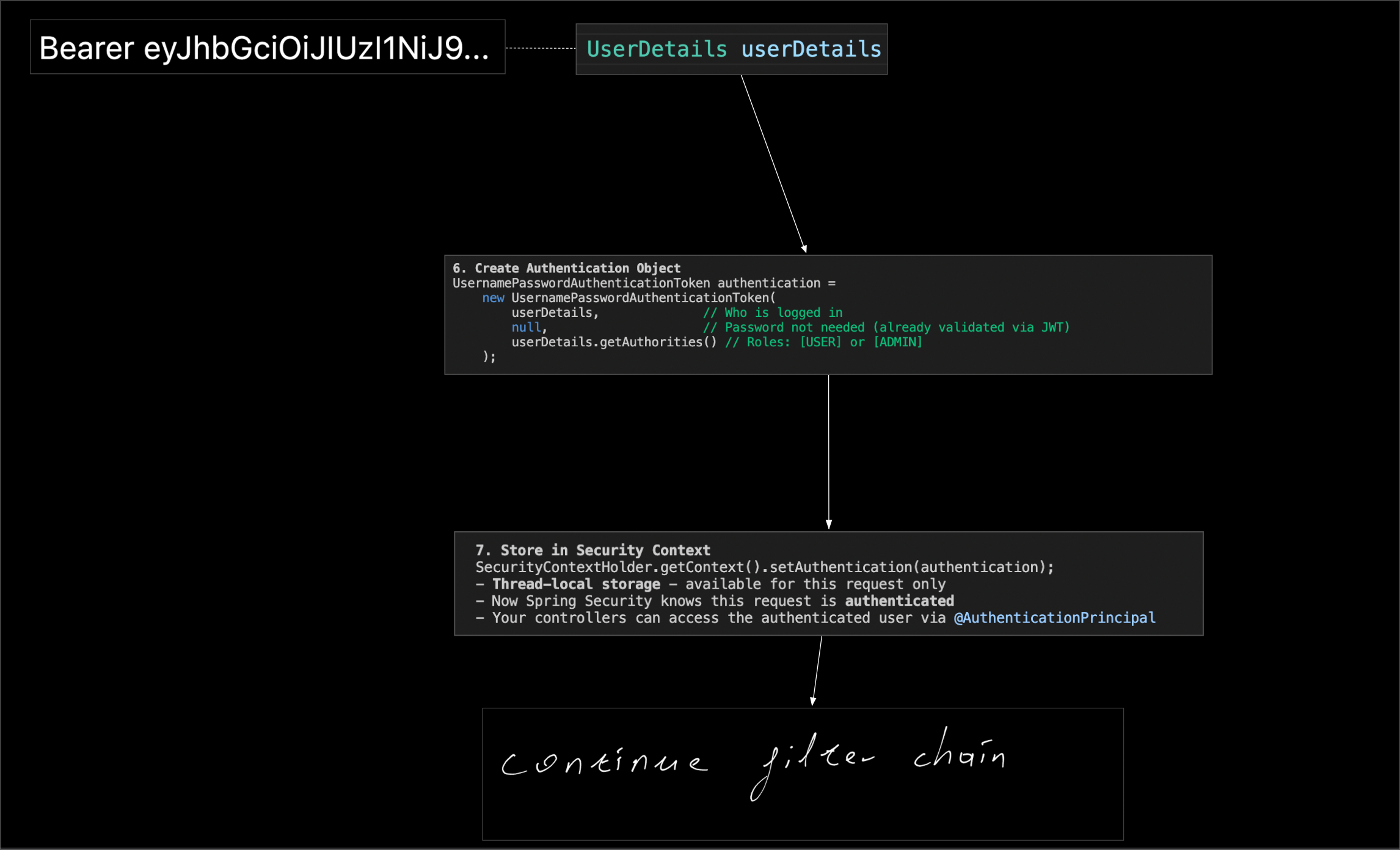
What happens?
- JWT token extracted and validated
- User loaded from database (or cache)
- Authentication stored in SecurityContext
- Request proceeds to controller
Step 2: Controller Receives Request
File: CartController.java
@RestController
@RequestMapping("/api/cart")
public class CartController {

    @Autowired
    private CartService cartService;

    @PostMapping("/items")
    @PreAuthorize("hasRole('USER')")  // Check role
    public ResponseEntity<CartDto> addToCart(
            @RequestBody @Valid AddToCartRequest request,
            Authentication authentication) {

        // 1. Get user ID from authentication
        Long userId = getUserIdFromAuthentication(authentication);
        // User entity from SecurityContext

        // 2. Log the request
        log.info("Add to cart: user={}, product={}, quantity={}",
                userId, request.getProductId(), request.getQuantity());

        // 3. Call service
        CartDto updatedCart = cartService.addToCart(userId, request);

        // 4. Return response
        return ResponseEntity.status(HttpStatus.CREATED).body(updatedCart);
    }

    private Long getUserIdFromAuthentication(Authentication authentication) {
        User user = (User) authentication.getPrincipal();
        return user.getId();
    }
}
@PreAuthorize Check:
- Before method executes, Spring Security checks role
- User must have "ROLE_USER" authority
- If not, throws
AccessDeniedException→ 403 Forbidden
Step 3: Service Layer - Business Logic
File: CartServiceImpl.java
@Service
@Transactional  // Start transaction
public class CartServiceImpl implements CartService {

    @Autowired
    private CartRepository cartRepository;

    @Autowired
    private ProductRepository productRepository;

    @Override
    @Transactional(isolation = Isolation.REPEATABLE_READ, rollbackFor = Exception.class)
    public CartDto addToCart(Long userId, AddToCartRequest request) {
        // Transaction starts here

        // 1. Find product (validate exists and active)
        Product product = productRepository
            .findByIdAndIsActiveTrue(request.getProductId())
            .orElseThrow(() -> new ProductNotFoundException(request.getProductId()));

        // 2. Validate stock availability
        if (product.getStockQuantity() < request.getQuantity()) {
            throw new InsufficientStockException(
                product.getName(),
                product.getStockQuantity(),
                request.getQuantity()
            );
        }

        // 3. Get or create cart for user
        Cart cart = getOrCreateCart(userId);

        // 4. Check if product already in cart
        Optional<CartItem> existingItem = cartItemRepository
            .findByCartIdAndProductId(cart.getId(), request.getProductId());

        if (existingItem.isPresent()) {
            // Update quantity
            CartItem item = existingItem.get();
            int newQuantity = item.getQuantity() + request.getQuantity();

            // Validate new quantity doesn't exceed stock
            if (product.getStockQuantity() < newQuantity) {
                throw new InsufficientStockException(...);
            }

            item.setQuantity(newQuantity);
        } else {
            // Create new cart item
            CartItem newItem = new CartItem();
            newItem.setCart(cart);
            newItem.setProduct(product);
            newItem.setQuantity(request.getQuantity());
            newItem.setPrice(product.getPrice());

            cart.addItem(newItem);  // Adds to list and sets bidirectional relationship
        }

        // 5. Recalculate cart total
        cart.calculateTotalPrice();
        // total = sum of (item.price * item.quantity) for all items

        // 6. Save cart (cascades to cart items)
        Cart savedCart = cartRepository.save(cart);

        // Transaction commits here (if no exception)
        // All database changes are permanently saved

        // 7. Convert to DTO and return
        return convertToDto(savedCart);
    }

    private Cart getOrCreateCart(Long userId) {
        return cartRepository.findByUserIdWithItems(userId)
            .orElseGet(() -> {
                User user = userRepository.findById(userId)
                    .orElseThrow(() -> new UserNotFoundException(userId));
                return cartRepository.save(new Cart(user));
            });
    }
}
Step 4: Repository Layer - Database Access
File: CartRepository.java
public interface CartRepository extends JpaRepository<Cart, Long> {

    @Query("SELECT c FROM Cart c LEFT JOIN FETCH c.items WHERE c.user.id = :userId")
    Optional<Cart> findByUserIdWithItems(@Param("userId") Long userId);
}
SQL Generated:
SELECT
    c.id, c.user_id, c.total_price, c.created_at, c.updated_at,
    ci.id, ci.product_id, ci.quantity, ci.price
FROM carts c
LEFT JOIN cart_items ci ON c.id = ci.cart_id
WHERE c.user_id = ?
JOIN FETCH: Loads cart and all items in one query (avoids N+1 problem)
Step 5: Entity Relationships in Action
File: Cart.java
@Entity
public class Cart {

    @OneToMany(mappedBy = "cart", cascade = CascadeType.ALL, orphanRemoval = true)
    private List<CartItem> items = new ArrayList<>();

    public void addItem(CartItem item) {
        items.add(item);
        item.setCart(this);  // Bidirectional relationship
        calculateTotalPrice();
    }

    @PreUpdate  // Called automatically before UPDATE
    protected void onUpdate() {
        updatedAt = LocalDateTime.now();
        calculateTotalPrice();
    }

    public void calculateTotalPrice() {
        this.totalPrice = items.stream()
            .map(item -> item.getPrice().multiply(BigDecimal.valueOf(item.getQuantity())))
            .reduce(BigDecimal.ZERO, BigDecimal::add);
    }
}
Cascade.ALL: When cart is saved, cart items automatically saved orphanRemoval: When item removed from list, deleted from database
Step 6: Response Conversion
private CartDto convertToDto(Cart cart) {
    CartDto dto = new CartDto();
    dto.setId(cart.getId());
    dto.setUserId(cart.getUser().getId());

    // Convert each cart item
    List<CartItemDto> itemDtos = cart.getItems().stream()
        .map(this::convertToCartItemDto)
        .collect(Collectors.toList());

    dto.setItems(itemDtos);
    dto.setTotalPrice(cart.getTotalPrice());
    dto.setItemCount(cart.getItemCount());

    return dto;
}
Why DTO instead of Entity?
- Hide internal structure
- Prevent infinite recursion (bidirectional relationships)
- Only send needed data
- Avoid lazy loading issues
Step 7: Response Sent
HTTP Response:
HTTP/1.1 201 Created
Content-Type: application/json

{
  "id": 3,
  "userId": 2,
  "items": [
    {
      "id": 7,
      "productId": 5,
      "productName": "Engine Oil Filter",
      "quantity": 2,
      "unitPrice": 12.99,
      "subtotal": 25.98
    }
  ],
  "totalPrice": 25.98,
  "itemCount": 1
}
Database Queries Executed
SELECT * FROM products WHERE id = 5 AND is_active = trueSELECT c.*, ci.* FROM carts c LEFT JOIN cart_items ci ON ... WHERE c.user_id = 2INSERT INTO cart_items (cart_id, product_id, quantity, price) VALUES (?, ?, ?, ?)UPDATE carts SET total_price = ?, updated_at = ? WHERE id = ?
Transaction Flow
Transaction Start
  ↓
Find Product (READ)
  ↓
Get Cart (READ)
  ↓
Create CartItem (INSERT)
  ↓
Update Cart.items (relationship)
  ↓
Recalculate total (UPDATE)
  ↓
Save Cart (triggers cascade to CartItem)
  ↓
Transaction Commit ✓
  ↓
All changes permanent
If exception occurs: Transaction ROLLBACK, all changes undone
Complete Flow Diagram
[Browser with JWT token]
   ↓ POST /api/cart/items
   ↓ Authorization: Bearer <token>
[JwtAuthenticationFilter]
   ↓ Extract token
   ↓ Validate signature
   ↓ Load user
   ↓ Set SecurityContext
[PreAuthorize] → hasRole('USER') ✓
   ↓
[CartController]
   ↓ @PostMapping("/items")
   ↓ Extract userId
   ↓ Validate request
[CartService] @Transactional START
   ↓ addToCart()
   ↓
[ProductRepository] → findById()
   ↓ Database: SELECT * FROM products
   ↑
[Validate] stock availability ✓
   ↓
[CartRepository] → findByUserIdWithItems()
   ↓ Database: SELECT carts + cart_items
   ↑
[Create CartItem]
   ↓ Set relationships
   ↓
[Cart] → addItem(), calculateTotal()
   ↓
[CartRepository] → save()
   ↓ Database: INSERT cart_items
   ↓ Database: UPDATE carts
@Transactional COMMIT ✓
   ↑
[Convert to DTO]
   ↑
[CartController] → Response
   ↑
[Browser] ← HTTP 201 + CartDto JSON
Socratic Questions
Q1: Why use @Transactional here? A: Multiple database operations must succeed together. If stock check passes but save fails, we don't want partial data. Transaction ensures atomicity.
Q2: What if two users add last item simultaneously?
A: Isolation.REPEATABLE_READ prevents this. First transaction locks the product row. Second transaction waits or gets stale data, then fails validation on commit.
Q3: Why convert to DTO instead of returning Cart entity directly? A: Security (hide sensitive fields), prevent infinite loops (bidirectional relationships), avoid lazy loading exceptions, and API stability (internal changes don't affect API).
Scenario 3: Get Cart with Items
User Story
"As a user, I want to view my shopping cart"
HTTP Request
GET /api/cart HTTP/1.1
Authorization: Bearer eyJhbGciOiJIUzI1NiJ9...
Simplified Flow (Building on Previous Knowledge)
1. Security Filter → Authenticates request (same as Scenario 2)
2. Controller
@GetMapping
@PreAuthorize("hasRole('USER')")
public ResponseEntity<CartDto> getCart(Authentication authentication) {
    Long userId = getUserIdFromAuthentication(authentication);
    CartDto cart = cartService.getCart(userId);
    return ResponseEntity.ok(cart);
}
3. Service Layer
@Override
@Transactional(readOnly = true)  // Optimization for read operations
public CartDto getCart(Long userId) {
    Optional<Cart> cartOptional = cartRepository.findByUserIdWithItems(userId);

    Cart cart;
    if (cartOptional.isPresent()) {
        cart = cartOptional.get();
    } else {
        // No cart exists, create empty one
        User user = userRepository.findById(userId)
            .orElseThrow(() -> new UserNotFoundException(userId));
        cart = cartRepository.save(new Cart(user));
    }

    return convertToDto(cart);
}
@Transactional(readOnly = true):
- Database can optimize (no locks needed)
- Prevents accidental writes
- Better performance
4. Repository
@Query("SELECT c FROM Cart c LEFT JOIN FETCH c.items WHERE c.user.id = :userId")
Optional<Cart> findByUserIdWithItems(@Param("userId") Long userId);
Single Query:
SELECT c.*, ci.*
FROM carts c
LEFT JOIN cart_items ci ON c.id = ci.cart_id
WHERE c.user_id = 2
Without JOIN FETCH (N+1 problem):
SELECT * FROM carts WHERE user_id = 2         -- 1 query
SELECT * FROM cart_items WHERE cart_id = 3    -- N queries (one per cart)
Response
{
  "id": 3,
  "userId": 2,
  "items": [
    {
      "id": 7,
      "productId": 5,
      "productName": "Engine Oil Filter",
      "quantity": 2,
      "unitPrice": 12.99,
      "subtotal": 25.98
    },
    {
      "id": 8,
      "productId": 12,
      "productName": "Brake Pads",
      "quantity": 1,
      "unitPrice": 45.00,
      "subtotal": 45.00
    }
  ],
  "totalPrice": 70.98,
  "itemCount": 2
}
Scenario 4: Update Cart Item Quantity
User Story
"As a user, I want to change the quantity of an item in my cart"
HTTP Request
PUT /api/cart/items/7 HTTP/1.1
Authorization: Bearer eyJhbGciOiJIUzI1NiJ9...
Content-Type: application/json

{
  "quantity": 5
}
Key Points
Controller
@PutMapping("/items/{itemId}")
@PreAuthorize("hasRole('USER')")
public ResponseEntity<CartDto> updateCartItem(
        @PathVariable Long itemId,  // Extracted from URL
        @Valid @RequestBody UpdateCartItemRequest request,
        Authentication authentication) {

    Long userId = getUserIdFromAuthentication(authentication);
    CartDto updatedCart = cartService.updateCartItem(userId, itemId, request);
    return ResponseEntity.ok(updatedCart);
}
@PathVariable: Extracts itemId from URL /items/7 → itemId = 7
Service Layer
@Override
@Transactional(isolation = Isolation.REPEATABLE_READ, rollbackFor = Exception.class)
public CartDto updateCartItem(Long userId, Long itemId, UpdateCartItemRequest request) {
    // 1. Get cart with items
    Cart cart = cartRepository.findByUserIdWithItems(userId)
        .orElseThrow(() -> new CartNotFoundException(userId));

    // 2. Find specific item in cart
    CartItem item = cart.getItems().stream()
        .filter(ci -> ci.getId().equals(itemId))
        .findFirst()
        .orElseThrow(() -> new CartItemNotFoundException("Item not found"));

    // 3. Validate stock availability
    Product product = item.getProduct();
    if (product.getStockQuantity() < request.getQuantity()) {
        throw new InsufficientStockException(...);
    }

    // 4. Update quantity
    item.setQuantity(request.getQuantity());

    // 5. Recalculate cart total
    cart.calculateTotalPrice();

    // 6. Save and return
    Cart savedCart = cartRepository.save(cart);
    return convertToDto(savedCart);
}
Database Queries
SELECT c.*, ci.* FROM carts c LEFT JOIN cart_items ci... WHERE c.user_id = ?SELECT * FROM products WHERE id = ?(validate stock)UPDATE cart_items SET quantity = ? WHERE id = ?UPDATE carts SET total_price = ?, updated_at = ? WHERE id = ?
Scenario 5: Admin Create Product
User Story
"As an admin, I want to create a new product"
HTTP Request
POST /api/admin/products HTTP/1.1
Authorization: Bearer eyJhbGciOiJIUzI1NiJ9... (admin token)
Content-Type: application/json

{
  "name": "Spark Plug Set",
  "brand": "NGK",
  "partNumber": "SP-4589",
  "category": "Engine Parts",
  "price": 29.99,
  "stockQuantity": 50,
  "description": "High-performance spark plugs",
  "isActive": true
}
Key Difference: Role-Based Access
Security Configuration
@Bean
public SecurityFilterChain filterChain(HttpSecurity http) {
    http.authorizeHttpRequests(authz -> authz
        .requestMatchers("/api/admin/**").hasRole("ADMIN")  // Only ADMIN
        .requestMatchers("/api/cart/**").hasAnyRole("USER", "ADMIN")  // USER or ADMIN
    );
    return http.build();
}
Controller
@RestController
@RequestMapping("/api/admin")
public class ProductController {

    @PostMapping("/products")
    @PreAuthorize("hasRole('ADMIN')")  // Double-check role
    public ResponseEntity<ProductResponseDTO> createProduct(
            @Valid @RequestBody ProductRequestDTO request) {

        // If user doesn't have ADMIN role:
        // AccessDeniedException → 403 Forbidden

        ProductResponseDTO created = productService.createProduct(request);
        return ResponseEntity.status(HttpStatus.CREATED).body(created);
    }
}
Service Layer
@Service
@Transactional
public class ProductService {

    public ProductResponseDTO createProduct(ProductRequestDTO request) {
        // 1. Validate part number uniqueness
        if (productRepository.existsByPartNumber(request.getPartNumber())) {
            throw new DuplicatePartNumberException(request.getPartNumber());
        }

        // 2. Create entity from DTO
        Product product = new Product();
        product.setName(request.getName());
        product.setBrand(request.getBrand());
        product.setPartNumber(request.getPartNumber());
        product.setCategory(request.getCategory());
        product.setPrice(request.getPrice());
        product.setStockQuantity(request.getStockQuantity());
        product.setDescription(request.getDescription());
        product.setIsActive(request.getIsActive());

        // 3. Save to database
        Product saved = productRepository.save(product);

        // 4. Convert to response DTO
        return convertToResponseDTO(saved);
    }
}
Access Control Flow
[Admin with JWT token] → POST /api/admin/products
   ↓
[JwtAuthenticationFilter]
   ↓ Extract user from token
   ↓ Roles: ["ROLE_ADMIN"]
[SecurityFilterChain]
   ↓ Check: /api/admin/** requires ADMIN role
   ↓ User has ADMIN? ✓ Allow
[ProductController]
   ↓ @PreAuthorize("hasRole('ADMIN')")
   ↓ Double-check role ✓
[ProductService]
   ↓ Business logic
[Database] ← INSERT product
   ↑
[Response] → HTTP 201 Created

---

[Regular User with JWT token] → POST /api/admin/products
   ↓
[JwtAuthenticationFilter]
   ↓ Extract user from token
   ↓ Roles: ["ROLE_USER"]
[SecurityFilterChain]
   ↓ Check: /api/admin/** requires ADMIN role
   ↓ User has ADMIN? ✗ Deny
[AccessDeniedException]
   ↓
[CustomAccessDeniedHandler]
   ↓
[Response] → HTTP 403 Forbidden
Summary
Common Patterns Across Scenarios
- Security First: JWT validated, roles checked
- Controller: Receives request, delegates to service
- Service: Business logic, transactions
- Repository: Database access
- DTO Conversion: Entity ↔ DTO for API communication
Request Flow Layers
HTTP Request
   ↓
Security Filters (JWT, roles)
   ↓
Controller (REST endpoints)
   ↓
Service (business logic, @Transactional)
   ↓
Repository (database access)
   ↓
Database (H2)
   ↑
Entity → DTO conversion
   ↑
HTTP Response
Practice Exercises
-
Trace Remove Item Flow:
- Write out complete flow for
DELETE /api/cart/items/7 - Include all layers, queries, transaction behavior
- Write out complete flow for
-
Add Logging:
- Add log statements at each layer
- Run request, observe logs in console
- Understand timing and flow
-
Break Security:
- Remove @PreAuthorize from cart endpoint
- Try to access as unauthenticated user
- Observe what fails and why
-
Examine Database:
- Open H2 console during request
- See data before and after
- Understand how entities map to tables
Next Steps
Now that you understand backend request flows:
- Review
frontend-fundamentals.mdfor React concepts - Study
frontend-scenarios.mdfor complete UI flows - See how frontend and backend connect
Questions? Test your understanding by tracing requests through the code!